

Free WhatsApp Link Generator: Create Custom wa.me Links & QR Codes Instantly
WhatsApp Link Generator
Create direct click-to-chat WhatsApp links, generate QR codes, and format your messages instantly. No coding required.
1. Enter Details
Welcome to the most advanced and privacy-focused WhatsApp Link Generator available on The Tech Board. In today’s fast-paced digital world, forcing potential clients or customers to manually save your phone number before they can send you a message is a massive point of friction. Every extra step a user has to take significantly drops your conversion rate.
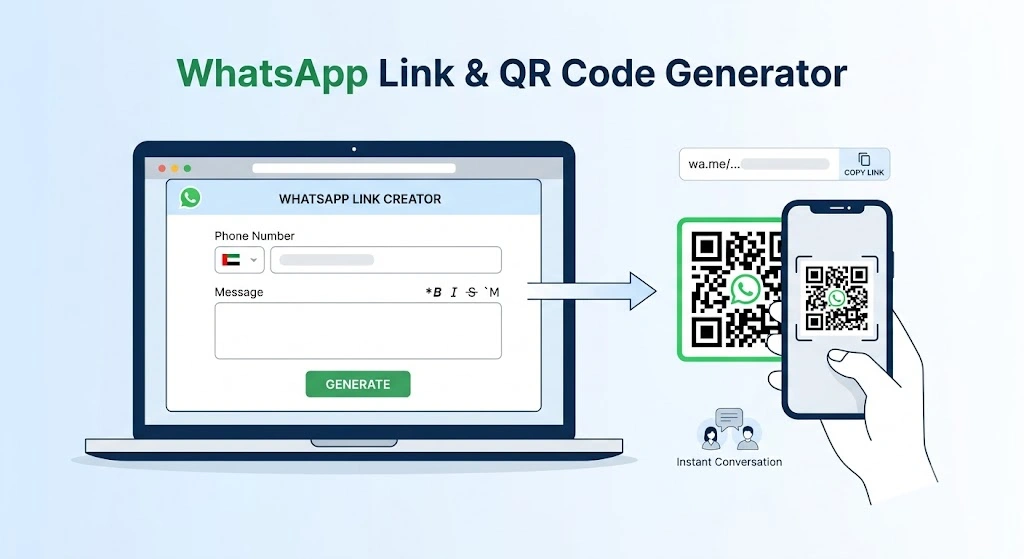
That is where the “Click to Chat” feature comes in. By creating a custom wa.me link, you allow users to start a WhatsApp conversation with you instantly, complete with a pre-filled message, simply by clicking a URL or scanning a barcode.
Whether you are running customer support, generating sales leads, or managing marketing campaigns, our comprehensive WhatsApp link creator is designed to streamline your workflow. Best of all, it runs entirely within your browser, ensuring maximum privacy and zero server latency.
Let’s explore the powerful features of this tool and how you can use it to boost your digital engagement.
Why Our WhatsApp Link Generator is Different
There are dozens of basic link builders out there, but we engineered this tool specifically for marketers, developers, and small business owners who need efficiency, accuracy, and security. Here is what makes our tool stand out:
- 100% Client-Side Processing (Zero Backend): This tool is built using pure, lightweight JavaScript that executes locally on your device. We do not use a PHP backend, which means your phone number and custom messages are never sent to, processed by, or stored on our servers. It is lightning-fast and entirely private.
- Smart Phone Number Input: One of the most common reasons WhatsApp links fail is incorrect international formatting. Our tool features a dedicated, searchable dropdown for the Country Code, separated from the actual phone number field. This guarantees that your final URL is formatted flawlessly every single time.
- Advanced Formatting Toolbar: WhatsApp supports rich text formatting, but remembering the exact syntax can be tedious. We have integrated a one-click toolbar directly into the message generator. Easily apply Bold (
*text*), Italic (_text_), ~~Strikethrough~~ (~text~), andMonospace(text) styling to your pre-filled messages to make your automated greetings look professional. - Time-Saving Quick Templates: Do not want to type the same message over and over? Use our built-in Quick Templates dropdown to instantly load highly converting, pre-written messages (e.g., “Hi, I need customer support,” or “I’m interested in buying your product”).
- Real-Time URL Preview & One-Click Copy: As you type your message and enter your number, the tool dynamically generates the
wa.melink in real-time. Once you are satisfied, hit the one-click copy button to instantly paste it into your Instagram bio, Facebook ads, or email signature. - Instant QR Code Generation: Not all users are browsing on their mobile devices. For desktop users or offline marketing materials (like flyers, business cards, or product packaging), our tool automatically generates a scannable QR code of your final link. You can scan it right from your screen to test it immediately, or download it for your marketing campaigns.
How to Create Your Custom WhatsApp Link
Using our generator is incredibly straightforward and takes less than a minute. Follow these simple steps:
- Select Your Country Code: Use the dropdown menu to find your specific international dial code.
- Enter Your WhatsApp Number: Type in your active WhatsApp Business or personal number (omit any leading zeros).
- Draft Your Pre-Filled Message: Type the exact message you want the user to send you. Use the Advanced Formatting Toolbar to add emphasis to key words or pricing. Alternatively, select a ready-to-use message from the Quick Templates menu.
- Preview and Copy: Review the live URL preview at the bottom of the screen. Click the “Copy Link” button to save it to your clipboard.
- Download Your QR Code: Grab the automatically generated QR code to use in your print media, presentations, or desktop-focused websites.
Top Use Cases for Custom WhatsApp Links
If you are not currently utilizing direct wa.me links in your digital strategy, you are leaving money and engagement on the table. Here are the most effective ways to deploy your newly generated links:
1. Social Media Bios (Instagram, TikTok, Twitter)
Social media platforms heavily restrict outgoing links, usually limiting you to just one URL in your bio. By placing a custom WhatsApp link (or a Linktree containing your WhatsApp link) in your profile, you create a direct, frictionless pipeline from a casual social media scroller to a direct, one-on-one sales conversation.
2. E-Commerce Customer Support
If you run an online store, cart abandonment is a major issue. Often, customers just have one quick question about shipping or sizing before they buy. Embed your custom WhatsApp link on your product pages or checkout screens. A pre-filled message like “Hi, I have a question about my cart before I checkout” can help you recover lost sales instantly.
3. Paid Advertising Campaigns (Facebook & Google Ads)
Instead of routing paid ad traffic to a generic landing page where users might bounce, route them directly into a WhatsApp chat. Set your pre-filled message to match the specific ad campaign (e.g., “Hi, I’m claiming the 20% off summer discount from your Facebook ad!”). This allows you to track exactly which ad generated the lead while instantly capturing their phone number for future follow-ups.
4. Offline Marketing via QR Codes
The physical world is just as important as the digital one. Print the tool’s automatically generated WhatsApp QR Code on restaurant menus, real estate signs, business cards, or event banners. Customers simply point their smartphone camera at the code, and their WhatsApp opens immediately with your tailored message.
Best Practices for WhatsApp Marketing
- Keep Pre-Filled Messages Natural: Write the pre-filled message from the perspective of the customer. It should sound like something they would naturally say, such as “Hi there, I’d like to book an appointment.”
- Always Test Your Links: Before launching an expensive ad campaign or printing 1,000 business cards, use your own phone to scan the generated QR code or click the copied link to ensure it routes to the correct number and displays the proper formatting.
- Use WhatsApp Business: While these links work perfectly fine with personal WhatsApp accounts, we highly recommend using the free WhatsApp Business app. It allows you to set up automated welcome messages, away hours, and quick replies, ensuring that when a customer clicks your generated link, they get an immediate, professional response.
Start Generating Now
Stop losing leads to complicated contact forms and manual phone number saving. Use the Free WhatsApp Link & QR Code Generator above to create your custom wa.me URL, streamline your customer communication, and accelerate your digital growth today.