
If you run a WordPress website, you already know how competitive online visibility has become. Whether you sell products, offer services, or run an informational blog, ranking on Google is essential for consistent traffic and leads. That’s where WordPress SEO Optimization becomes your most powerful growth tool. With the right techniques, plugins, and content structure, you can outrank competitors, drive organic traffic, and turn your website into a conversion machine.
In this comprehensive two-part guide, you’ll learn exactly how to optimize your WordPress website using real, actionable strategies. This guide follows Rank Math SEO best practices and industry-standard techniques to help you build authority and achieve long-term rankings.
If you prefer a professional to optimize your SEO, you can check our WordPress SEO Optimization Service here:
👉 WordPress SEO Optimization
Why WordPress SEO Optimization Matters in 2025
Google processes billions of searches every single day. If your website is not optimized, you’re missing out on explosive traffic potential. Search intent and user experience matter more than ever, and Google rewards websites that follow best practices such as:
Fast loading speed
Mobile responsiveness
High-quality content
Proper keyword optimization
Clean technical structure
WordPress is the world’s most SEO-friendly CMS—but only if properly optimized.
Step 1: Install Rank Math – The #1 WordPress SEO Plugin

Rank Math gives you full control over your on-page SEO, sitemaps, schema, indexing, page titles, and meta descriptions. For 2025, it continues to outperform Yoast SEO and All-in-One SEO due to its:
Lightweight structure
Advanced schema generator
Redirection manager
AI content suggestions
Local SEO module
Powerful keyword optimization tool
Rank Math Initial Setup Checklist
Set up your sitemap (XML Sitemap ON).
Connect Google Search Console + Google Analytics.
Enable IndexNow for faster crawling.
Enable Schema Markup (Article, Service, Product).
Set up Breadcrumbs for internal navigation.
Make sure your site identity, social preview, and global meta settings are correctly configured.
Step 2: Keyword Research for Powerful WordPress SEO
Keyword research is the foundation of every successful SEO strategy. You must target keywords with the right balance of:
Search volume
Competition
User intent
Types of Keywords You Must Target
✔ Primary Keywords:
Example: WordPress SEO Services, WordPress SEO Optimization, SEO for WordPress website
✔ Long Tail Keywords:
Example: how to improve WordPress website ranking, best SEO plugin for WordPress, optimize WordPress speed for SEO
✔ LSI Keywords (Semantic Keywords):
Rank Math uses these to evaluate content quality.
Use tools like Google Trends, Ahrefs, SEMrush, and Rank Math’s built-in suggestion tool to pick keywords.
Step 3: Optimize Your WordPress Website Structure
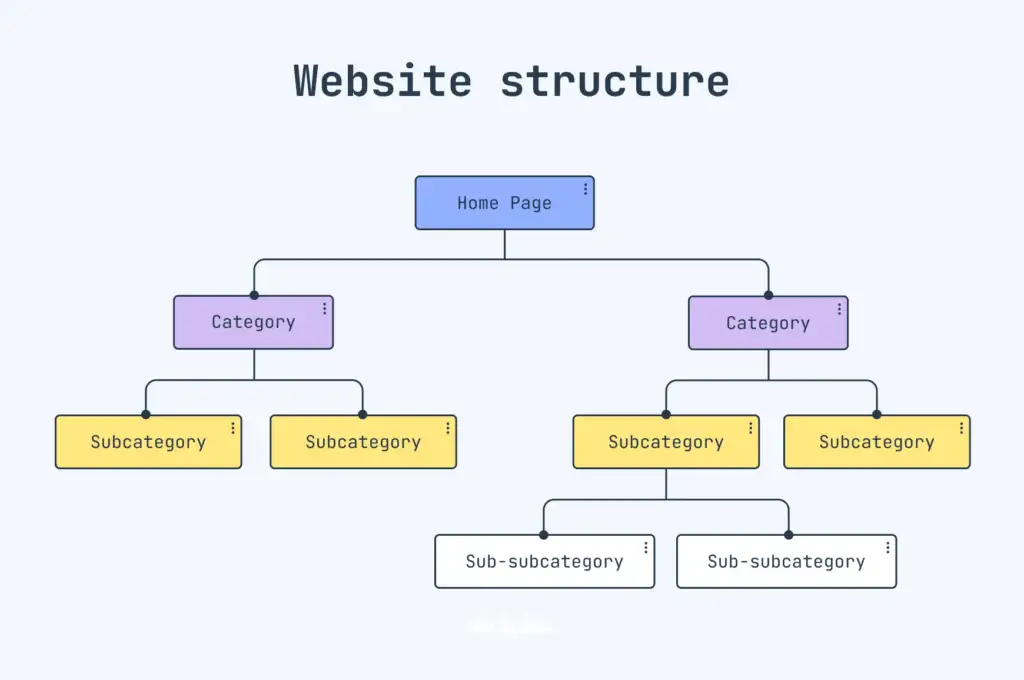
A solid website structure improves both user experience and crawlability. Google favors websites with clean, logical layouts.
Essential Website Structure Tips
Maintain a simple navigation menu
Use clean permalinks (example: /wordpress-seo-tips/)
Add categories for blog posts
Keep pages accessible within 3 clicks
Create cornerstone content
A logical structure improves your internal linking and helps search engines understand which pages are more important.
Step 4: On-Page SEO Using Rank Math
Rank Math gives you a score (0–100). Aim for 80+ by optimizing the following:
✔ Meta Title Optimization
Include the primary keyword at the beginning.
Example:
WordPress SEO Optimization Services | Boost Your Website Ranking
✔ Meta Description Optimization
Make it readable and keyword-rich.
Example:
Boost your search rankings with expert WordPress SEO Optimization. Improve speed, visibility, keywords, and conversions with our proven strategies.
✔ Headings (H1–H3 Structure)
Use only one H1 containing your main keyword.
Use H2 and H3 for supporting topics.
✔ Content Optimization
Add keywords naturally
Use LSI keywords
Add FAQ questions
Include images with alt tags
Add internal links (important)
Add external authoritative links
✔ Image Optimization
Compress images
Use WebP format
Optimize alt tags with keywords
Step 5: Add Internal Linking to Boost Rankings
WordPress SEO Optimization heavily depends on internal linking. This increases authority, reduces bounce rate, and improves indexing.
Internal links you must include:
Service pages
Portfolio pages
Blog articles
Category pages
Example internal link (this increases SEO authority):
👉 WordPress SEO Optimization
Internal links help Google understand which pages you want to rank the most.
Advanced WordPress SEO Optimization Techniques
So far you learned the foundational steps for setting up Rank Math, optimizing your site structure, and preparing your content for Google. Now, in Part 2, we dive deeper into advanced WordPress SEO Optimization techniques—the same methods used by top SEO agencies to consistently rank WordPress websites on page 1.
This guide will help you unlock more traffic, improve engagement, and build long-term authority in your niche. If you need hands-on optimization, explore our service:
👉 WordPress SEO Optimization
Step 6: WordPress Speed Optimization (Crucial for SEO in 2026)
Google Core Web Vitals is more important than ever. Your website’s ranking heavily depends on:
Loading speed
Interactivity
Layout stability
Key Tools You Should Use
PageSpeed Insights
GTmetrix
Cloudflare CDN
LiteSpeed Cache or WP Rocket
Speed Optimization Checklist
✔ Minify CSS/JS
✔ Enable lazy loading
✔ Use a fast theme (Astra, GeneratePress)
✔ Compress all images
✔ Use WebP images
✔ Optimize your hosting
✔ Remove unused plugins
✔ Preload and prefetch critical files
Slow websites lose rankings—fast websites win.
Step 7: Technical SEO Optimization
Technical SEO is one of the most overlooked areas in WordPress SEO Optimization, but it directly affects Google’s ability to crawl and index your pages.
Technical SEO Checklist
Fix broken links
Ensure sitemap is submitted
Use robots.txt correctly
Enable breadcrumbs
Ensure all pages have canonical URLs
Remove duplicate content
Use schema (Rank Math handles this)
Schema Markup You Must Use
Article Schema
Website Schema
Service Schema
Local Business Schema
FAQ Schema
Using schema makes your search appearance richer and increases CTR.
Step 8: Mobile SEO Optimization
70%+ users browse websites using mobile devices. Google uses a “mobile-first indexing” system, meaning your mobile version decides your ranking.
Mobile Optimization Tips
✔ Use responsive design
✔ Use large, readable fonts
✔ Avoid oversized images
✔ Avoid popups that block content
✔ Test on multiple screen sizes
Tools:
Google Mobile-Friendly Test
BrowserStack
Step 9: High-Authority Content Strategy
Content is still king—but only if it’s optimized.
Content Types That Rank the Fastest
How-to guides
Tutorials
Comparisons (WordPress vs Shopify)
Service-oriented articles
Local SEO pages
Follow Rank Math content guidelines:
Use focus keyword 3–4 times
Add LSI keywords
Add FAQs
Add internal links
Add external authority links
Example internal link (boosts your SEO service page):
👉 WordPress SEO Optimization
Step 10: Off-Page SEO & Backlinks
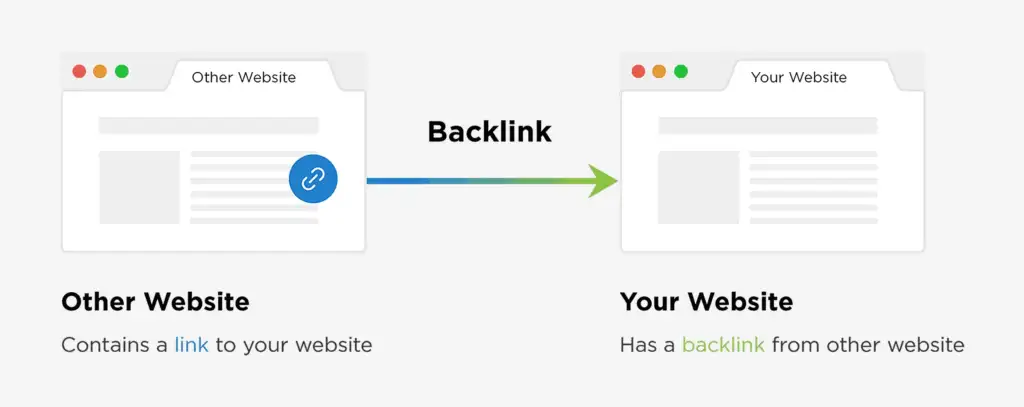
Backlinks remain one of the strongest ranking factors.
Best Backlinks for WordPress SEO
Guest posts
Social profiles
Directory submission
Niche edits
Authority links
Blog comments (natural)
Quora answers
Reddit participation
Avoid spammy backlinks—they harm your ranking.
Step 11: Local SEO (If You Offer Services)
If your site provides WordPress or SEO services, local SEO can help you rank for city-based searches such as:
WordPress SEO expert in Dubai
Best Shopify expert in Pakistan
SEO services near me
Local SEO Checklist
Create a Google Business Profile
Add local schema
Add NAP (name, address, phone)
Add location pages
Get local citations
Step 12: Analytics, Tracking & Continuous Optimization
SEO is not a one-time task. You must monitor performance and improve regularly.
Track Using These Tools
Google Search Console
Google Analytics 4
Rank Math Analytics Module
Ahrefs WebMaster Tools
Check:
✔ Clicks
✔ Impressions
✔ CTR
✔ Keyword movement
✔ Page indexing status
Conclusion
By following these advanced strategies, your website will be fully optimized for the 2025 ranking landscape. Combining on-page SEO, technical SEO, content optimization, speed improvement, and backlink building creates a strong, long-term SEO foundation.
If you want an expert to handle everything for you, explore our service page:
👉 WordPress SEO Optimization